Whether it is about offering personalized recommendations or predictive analytics and intelligent automation in the apps, AI is an integral part that helps offer modern digital experiences. The world now revolves around Artificial Intelligence, so if you are considering how to add AI to your app but are unsure where to begin, you are not alone. Most businesses are aware of the AI potential but struggle to translate their vision into a scalable implementation.
Integrating AI into your application is more than simply choosing the tools; it involves identifying the right use cases, choosing the right AI models, hiring the right team of developers, and ensuring its seamless integration with existing mobile and web architecture. AI in mobile app development allows businesses to improve user experience and boost decision-making, while automating complex workflows.
According to a recent study, over 63% of mobile app developers are integrating AI-driven features into their apps, and 45% plan to add more AI capabilities in the coming year. This clearly indicates that AI in mobile app development has become an industry norm.
Whether you want to explore how to use AI in mobile app experiences, check for real-time insights, or integrate an ML model into your app for personalization, this is a complete guide that helps you walk through the entire process step by step. From the right strategy to deadlines and development, we break down everything you must know, including when to hire Indian developers to accelerate your journey.
Why AI is Vital in Modern App Development: Trends and Benefits
AI transforms user experience and offers a competitive advantage in the modern landscape. With AI integration, users can enjoy a completely different experience. Here is a breakdown of the key reasons AI becomes indispensable in mobile app development.
1. AI Is Becoming Core to Mobile Experiences
The mobile AI market continues to expand rapidly, with projections that the global AI in mobile apps market could exceed $320 billion by 2034, driven by demand for natural language processing, computer vision, and predictive analytics features.
2. Enhanced Personalization and Engagement
One of the major drivers of AI adoption is the ability to deliver hyper-personalized experiences. AI-powered apps analyze user behavior in real time. From preferences to contextual signals, AI offers you the ability to tailor content, product suggestions, or interface changes. AI-driven personalization significantly boosts user engagement and retention, with many businesses reporting higher satisfaction rates.
With AI-driven personalization, there is improved user satisfaction and retention. It has also reported with a higher customer satisfaction
3. Smarter Automation & Customer Interactions
AI-powered tools like chatbots and virtual assistants are now handling up to 80% of customer interactions within apps, providing 24/7 support without the need for large support teams. This not only improves response times but also reduces operational costs, a major benefit of integrated AI.
4. Real-Time Data Insights and Smart Decisions
AI offers much more than UX enhancements. It gives developers and businesses deep insights into app performance and user behavior. Predictive analytics and ML models can forecast trends and make real-time adjustments that drive better outcomes. With AI-driven analytics, marketers have seen as much as a 30% increase in conversion metrics.
5. Faster Development and Testing
Integrating AI in mobile app development is not only about personalization and improved user features. It also helps improve the development process and testing. Hire AI developers who can leverage tools to streamline repetitive tasks like testing, performance monitoring, and more. AI accelerates the time to market and allows teams to focus on more innovative strategies.
6. Competitive Advantage and Market Growth
Forecasts show that there is a rapid adoption and growth in the AI mobile app market, and the businesses that are leveraging intelligent features are positioning themselves ahead of the curve. Therefore, AI is becoming a baseline exception for the applications, especially in sectors like retail, healthcare, fintech, and more.
How to Integrate AI Into An App: Step-by-Step Guide
The most effective way to implement AI in your application is to break it down into actionable steps. Without a proper roadmap, you can not implement AI. Here is a clear step-by-step roadmap that helps you integrate ML models into your app, add features, and deliver smart experiences.
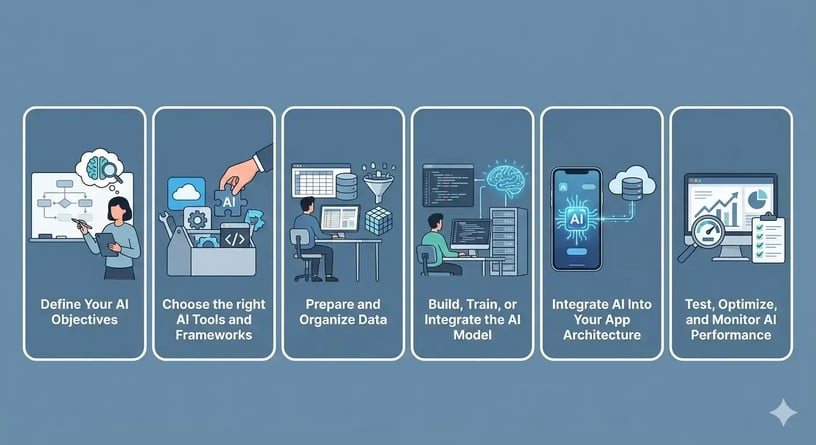
Step 1: Define Your AI Objectives
Implementing AI just because your competitors are doing so is, of course, not the right strategy.
It must solve real-world problems. One of the successful examples of already integrated AI is those that can help enhance the user experience, functionality, improve efficiency, and automate tasks.
Start With the Problem, Not the Technology
Ask yourself these questions:
-
Are there repetitive and monotonous tasks in the app?
-
Where can you offer a faster and customized experience for the users?
-
What decisions rely on data patterns and predictions?
For example, if you are an e-commerce business and wish to manage customer queries, order processing, and interaction, you can implement an AI agent that can streamline the process. Unlike chatbots, an AI agent can autonomously handle tasks. AI excels in areas such as data processing, pattern recognition, and automation, making these ideal starting points.
Step 2: Choose the right AI Tools and Frameworks
Once you finalize your objective, the next important step is choosing the right tools, frameworks, and platforms that can actually help implement the AI solution. Many businesses hire mobile app developers with experience in AI for mobile app development for seamless implementation across different platforms. For cross-platform apps, companies often choose to hire Flutter app developers to build an app with a single codebase.
1. Choose Between Pre-Built APIs vs. Custom AI Models
Pre-Built AI APIs:
-
Services like OpenAI GPT and Google Cloud AI offer ready-to-use models for NLP and predictive analytics.
Custom AI Models:
-
Train your machine learning models using frameworks like TensorFlow or PyTorch.
Tip: For startups or MVPs, pre-built APIs are often the fastest way to add AI to your app.
Recommended Read: How to Build an AI MVP in 30 Days: Proven Step-by-Step Roadmap
2. Select the Right Framework for Mobile Integration
Depending on your app’s platform:
-
iOS: Core ML, Create ML
-
Android: TensorFlow Lite, ML Kit
-
Cross-platform: Fritz AI, TensorFlow Lite
3. Consider Automation and Agent-Oriented Tools
If your app will be using AI agents, consider workflow automation platforms. Rasa and LangChain are a few frameworks that can help. The tools enable AI agents to analyze data and streamline user interactions.
4. Evaluate Integration and Maintenance
When choosing tools, consider:
-
It is easy to integrate with the existing tech stack
-
Compatibility with different mobile development frameworks
-
As AI evolves, ensure it can offer support for scaling and updates
Proper selection here ensures your AI in mobile app development is robust and future-ready.
Step 3: Prepare and Organize Data
Poor quality data can significantly impact AI accuracy and performance, leading to unreliable predictions. AI models rely on well-structured data that helps deliver accurate results. Therefore, it is vital to ensure and collect relevant data that boosts user retention. With proper data labeling, organizations can improve custom model accuracy. Robust data governance, compliance, and privacy regulations like GDPR and HIPAA are met.
Key Aspects of Data Preparation
To successfully integrate an ML model into your app, focus on the following areas:
-
Data Collection: Gather relevant data from app usage, user interactions, transactions, sensors, or third-party sources.
-
Data Cleaning: Remove duplicates and correct errors to ensure the results are accurate
-
Data Labeling: If you’re using models trained on labeled data, ensure your data is labeled accurately.
-
Data Storage & Access: Choose scalable and secure storage that lets your AI models access data safely, anytime, with ease.
Step 4. Build, Train, or Integrate the AI Model
Once your data is prepared, the next step is to decide whether to build a custom AI model, train an existing model, or integrate a pre-trained model into your application. Most of the businesses choose to use a pre-trained model like ChatGPT, which, without much effort, adds intelligence like text analysis, image recognition, and more. If the requirements are around a specific domain, businesses can choose custom machine learning models that can be trained according to their data to deliver accurate and consistent results. This is the step where you truly begin to integrate ML models into your app and bring intelligent functionality to life.
Step 5. Integrate AI Into Your App Architecture
The AI model is ready; the next step is to embed it into your app’s existing architecture. The AI model is connected to the app frontend via APIs. It processes user inputs and offers results in real-time. For a smooth performance in AI in mobile app development, the workload is handled on the backend via cloud services. Right and proper integration at this stage ensures the AI features look natural, not an add-on.
Key considerations during these integrations include:
-
SDK or API connectivity for secure and real-time communication.
-
Backend or cloud-based processing for optimized performance.
-
Latency optimization for a robust user experience.
-
Error handling and fallback mechanisms to maintain the app's stability, even if the AI services fail.
Step 6: Test, Optimize, and Monitor AI Performance
Ensure to perform thorough testing and optimizations for a reliable performance. From testing the AI features accuracy to speed and scalability, test it across different platforms and devices. Monitoring how AI integration actually behaves in production helps with issue identification, such as biased outputs or unexpected errors. Regular optimization ensures the AI-powered features are accurate and aligned with evolving user behavior.
Deploy, Scale, and Maintain Your AI-Powered App
Now the final step is deploying your AI-powered app and preparing it for real-world usage. As data patterns and user behavior change with time, AI models need continuous improvement and maintenance. Scaling AI features involves upgrading the cloud infrastructure and optimizing APIs to handle traffic. With regular updates and security checks, you can ensure that AI-powered apps are compliant and competitive.
Common Challenges in AI App Integration and How to Overcome
|
Challenge |
Impact |
How to Overcome |
|
Data Quality Issues |
Inaccurate or inconsistent data leads to poor AI predictions. |
Clean, preprocess, and label data properly; use data validation tools. |
|
Lack of Skilled Talent |
Difficult to build, integrate, and optimize AI features. |
Hire experienced developers, AI developers, mobile app developers, or Flutter developers. |
|
Integration Complexity |
AI features may slow down the app or break workflows. |
Choose the right APIs/SDKs; follow best practices for backend/cloud integration. |
|
Model Maintenance & Updates |
AI performance can degrade as user behavior evolves. |
Regularly retrain models and monitor performance metrics in production. |
|
Compliance & Privacy |
Risk of violating regulations like GDPR or CCPA. |
Implement secure data handling, anonymization, and clear user consent mechanisms. |
Final Thoughts
Successfully learning how to integrate AI into an app requires more than just adding intelligent features; it’s about building a scalable system that evolves with your app users. By following a structured, step-by-step approach, businesses can confidently apply artificial intelligence, integrate ML models, and deliver smarter mobile experiences that drive long-term value.
For businesses looking to adopt AI, Your Team in India offers an expert team of developers who can seamlessly integrate AI into your mobile or web apps. You can hire mobile app developers to build scalable, intelligent solutions tailored to your business needs.
Frequently Asked Questions

Incorporating AI improves personalization and automates tasks while maintaining user trust. By analyzing the user behavior, AI can deliver a smarter experience.
It involves preparing accurate data, choosing a framework, and connecting the model to the app via APIs or SDKs. Then perform a thorough test for accurate results.
Identify high-impact use cases such as automating support, offering recommendations, or detecting anomalies. Then, choose AI tools that fit your data and workflow, and ensure proper integration with your app.
You can hire skilled AI developers with experience integrating AI into mobile or web apps. Partnering with experienced professionals ensures efficient development and scalable AI-powered solutions.





%20(1)%20(1).webp?width=352&name=Programming%20Outsourcing%20(2240%20x%201260%20px)%20(1)%20(1).webp)


 4.8 out of 5 by