Node.js is an open-source, cross-platform runtime that lets you run JavaScript outside the browser. Ryan Dahl released it in 2009 on top of Chrome’s V8 engine, with a simple goal: let developers use the same language on the server that they already write on the front end.
What sets it apart is how it handles waiting. A traditional server holds a thread open while a database query or API call finishes. Node.js doesn’t. It fires off the request, moves to the next one, and comes back when the result is ready. A single process can keep thousands of connections open this way, which is why chat apps and live dashboards run well on it.
Teams usually pick it for a handful of reasons, which we cover below: its core Node.js features, the practical benefits of Node.js for product teams, and the range of Node.js applications it handles well. If you’re weighing it against another stack, our Node.js vs PHP comparison goes through the trade-offs. And if you’re ready to build, you can hire Node.js developers from our India-based team.
How Did It All Start? The Origin of Node.js
Ryan Dahl created Node.js because he was unhappy with how Apache HTTP Server handled many connections at once. It tied up a thread per connection, and those threads sat idle during slow tasks like file uploads. He wanted a model where nothing blocks.
He built it around Google’s V8 engine, added an event loop and a low-level I/O layer, and demoed it at JSConf EU on November 8, 2009. In January 2012, Dahl handed the project to Isaac Schlueter, the creator of npm. Since 2019, it has been maintained under the OpenJS Foundation.
How Does Node.js Work
Node.js runs your JavaScript on one main thread and leans on the event loop and a few background helpers to keep that thread free. Here’s what each piece does.
The V8 Engine: Node.js runs on V8, the JavaScript engine Google built for Chrome. V8 compiles your code to machine code while the program runs, which is a big reason Node.js performs well.
A Single Main Thread: Your JavaScript executes on one main thread. With a single thread, you have no locks to manage and no race conditions between threads in your own code.
The Event Loop: The event loop keeps that thread from getting stuck. It comes from libuv, a C library Node.js uses for asynchronous work. When your code asks for something slow, like a database query or a file read, Node.js hands the task off and moves on. Once the result is ready, the event loop queues the callback and runs it. Newer code usually expresses this with promises and async/await instead of nested callbacks.
Thread Pool and Worker Threads: Some jobs would block the main thread no matter what. File system access and hashing go to a libuv thread pool that runs in the background, with four threads by default. Network calls rely on the operating system’s own async tools. For heavy CPU work such as image processing, worker threads let you run JavaScript in parallel without freezing the event loop.
Node.js Applications: What It Is Best Suited For
Node.js works best where an app has to handle many connections at once and respond quickly. These are the Node.js applications where teams get the most out of it.
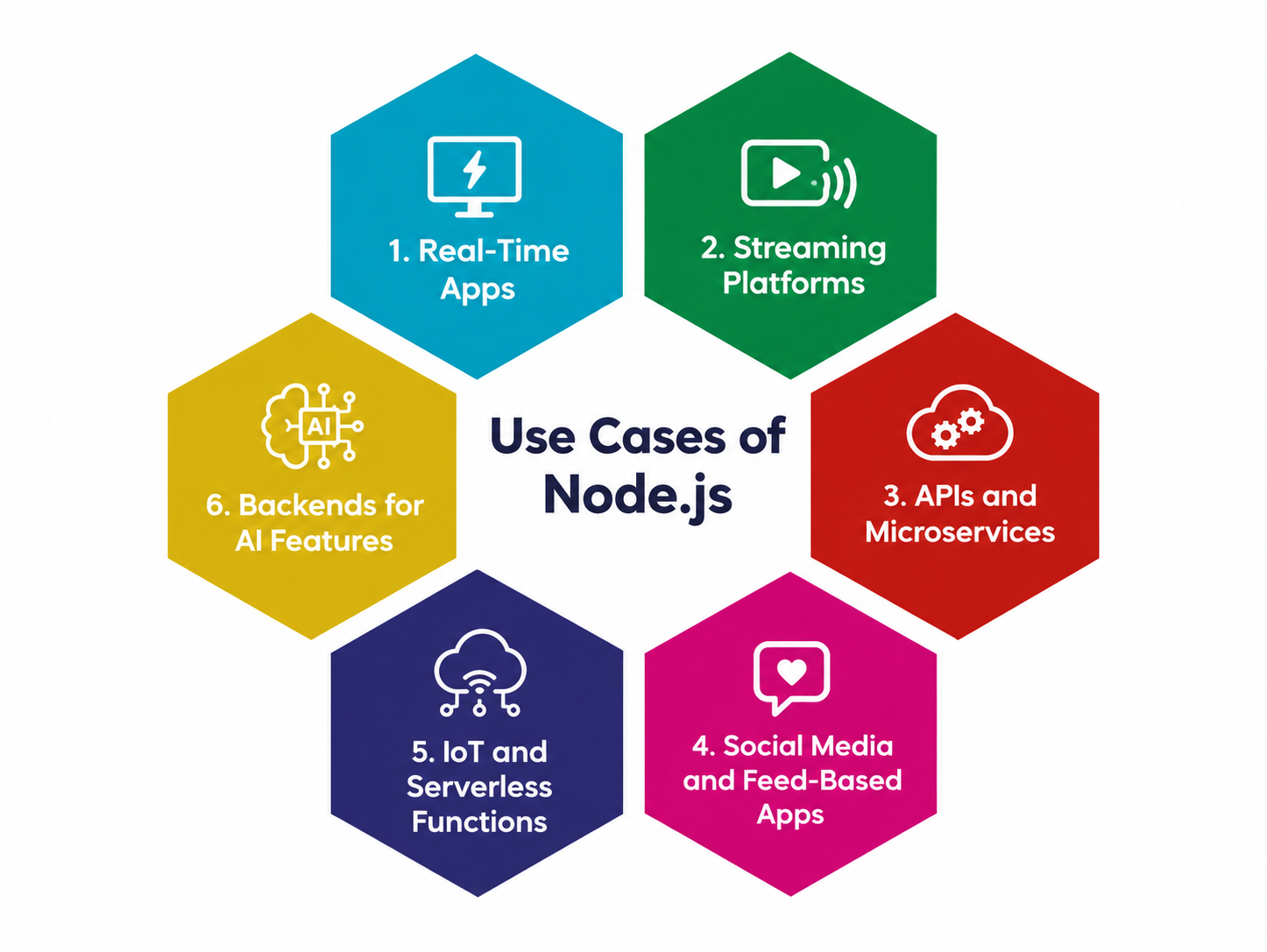
1. Real-Time Apps
Chat tools, collaboration platforms, live dashboards, and multiplayer games all depend on instant two-way communication. Node.js handles WebSocket connections well, so a single server can keep a large number of users updated at the same time.
2. Streaming Platforms
Node.js processes data in chunks as it arrives instead of waiting for a full file. That suits video and audio delivery, file uploads, and any pipeline that moves large amounts of data.
3. APIs and Microservices
Most Node.js work today is API development. Small services that each do one job are easy to build and deploy in Node.js, and they pair well with containers and Kubernetes.
4. Social Media and Feed-Based Apps
Feeds, notifications, and activity streams generate a constant flow of small requests. The non-blocking model handles that load without much overhead.
5. IoT and Serverless Functions
Devices send lots of small messages, and Node.js can take them in without strain. Its fast startup time also makes it a common pick for serverless functions on AWS Lambda and similar platforms.
6. Backends for AI Features
Apps that stream responses from language models need a server that can push tokens to the browser as they arrive. Node.js does this naturally, which is why many AI chat interfaces run on it.
What Are the Key Features of Node.js
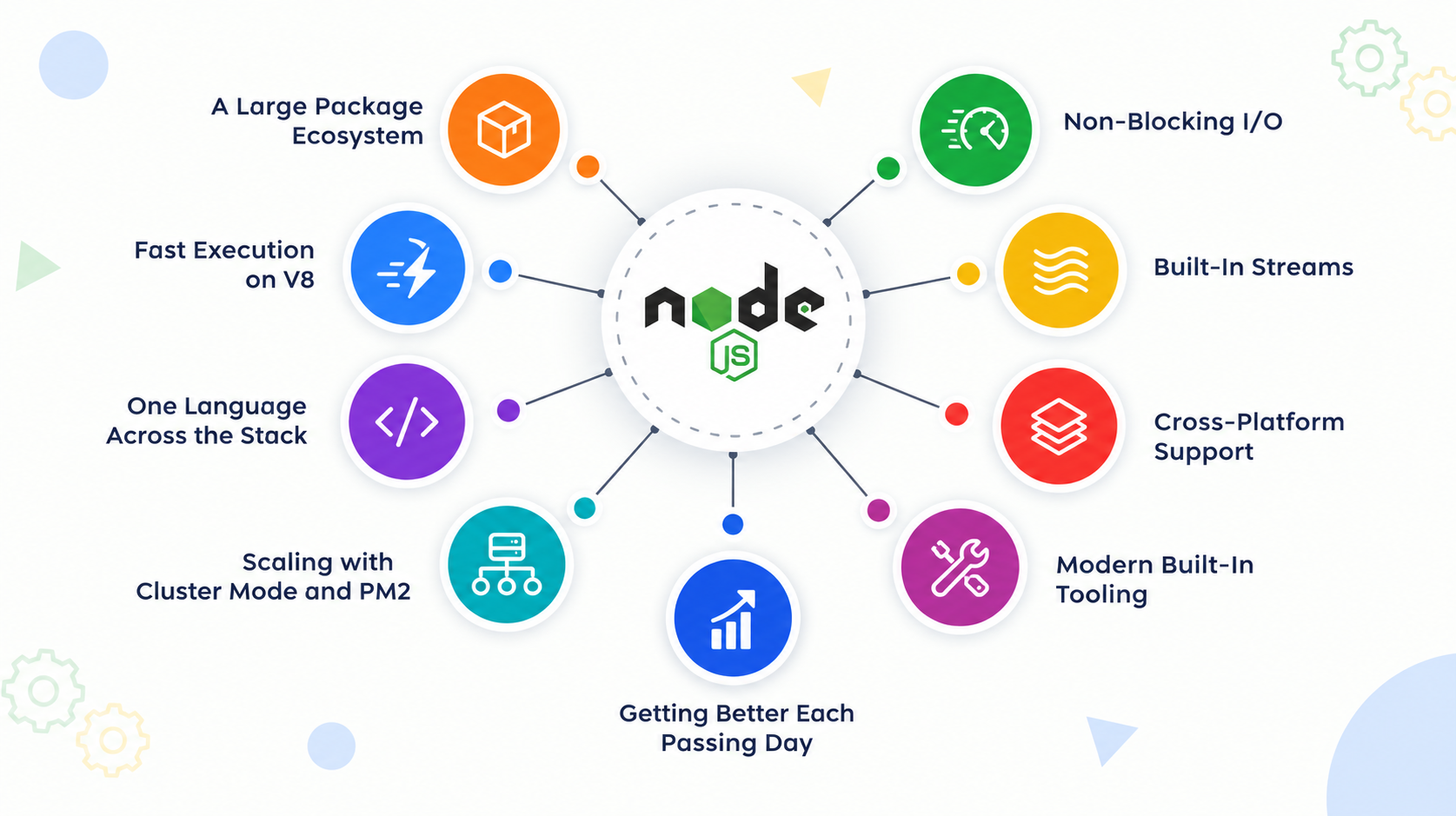
These Node.js features explain why teams keep picking it for new projects, and a few of them only arrived in recent releases.
-
A Large Package Ecosystem
npm, the package manager that ships with Node.js, hosts more than two million packages. Whether you need authentication or PDF generation, a maintained package usually exists. Installing, updating, and publishing code all run through one command-line tool.
-
Non-Blocking I/O
Node.js hands slow work like database queries and network calls to the event loop and keeps serving other requests in the meantime. One server can hold thousands of open connections on modest memory, and that’s the main reason Node.js suits real-time workloads.
-
Fast Execution on V8
V8 compiles JavaScript to machine code and keeps optimizing frequently used code paths while the program runs. The Node.js team ships updates on a regular schedule, security patches included. Projects on a supported LTS release get the speed gains and the fixes together.
-
Built-In Streams
Node.js can process data in chunks as it arrives. A large file can be uploaded, compressed, and written to storage without ever sitting fully in memory. That cuts both memory use and processing time for big files.
-
One Language Across the Stack
The same JavaScript runs in the browser and on the server. Teams share validation rules and utility code between front end and back end, and developers can work on both sides without switching languages.
-
Cross-Platform Support
Node.js runs on Windows, macOS, and Linux with the same code. Pair it with Electron or NW.js and that code can also power desktop apps.
-
Scaling with Cluster Mode and PM2
The built-in cluster module starts one process per CPU core so a server uses all of its hardware. PM2 sits on top and handles restarts, logs, and monitoring. Small Node.js services also start quickly, which is why they work well as microservices in containers.
-
Modern Built-In Tooling
Recent releases include a native test runner, a watch mode that restarts your app when files change, a built-in fetch API for HTTP calls, and support for running TypeScript files by stripping the types. Many projects now need fewer third-party dev dependencies than they did a few years ago.
-
Getting Better Each Passing Day
Node.js is improving for the better each passing day. It keeps launching new releases while enhancing the standard of the codes/features. Moreover, with the support of an open-source community, this technology will be nourishing in the near future.
The Benefits of Choosing Node.js
The benefits of Node.js reach past raw speed. They show up in how fast a team ships and in how well the product holds up when traffic climbs. For a closer look at what a custom build can do for a business, read our guide to the benefits of Node.js development.
1. Faster Development With One Language
Front end and back end both run on JavaScript, so a developer can work on either side. Validation rules and helper code get shared instead of written twice. Fewer handoffs between teams means fewer bugs from logic that drifted apart.
2. Quicker MVP Launches
An MVP is the smallest version of a product that real users can try. Node.js suits that stage well because npm already has packages for login, payments, and most other basics. A startup can get something in front of users in weeks, then keep building on the same codebase.
3. Room to Scale
When traffic grows, you can run more Node.js instances behind a load balancer or split the app into microservices. Cluster mode lets one machine use all of its CPU cores. Connections are cheap in Node.js, so a modest server carries a lot before you need more hardware.
4. Strong Performance for I/O-Heavy Work
V8 and the non-blocking model make Node.js quick at serving APIs, chat, and streaming. It’s a weaker fit for heavy number crunching on the main thread. Those jobs belong in worker threads or a separate service, and a good team plans for that early.
5. A Deep Talent Pool and Community
JavaScript is one of the most widely used languages, so finding developers is easier than for many other stacks. The community maintains thousands of well-tested packages and answers questions quickly. That size has a flip side, because every package you install needs vetting. Our guide on how to protect your Node.js application from malicious modules covers it. If you’d rather skip the hiring hunt, you can hire Node.js developers from our India-based team.
Why are Companies Switching to Node.js Development?
Companies don’t move to Node.js for the novelty. They move because the stack saves them time and money once a product is live. Three reasons come up again and again.
Fewer Moving Parts: When the whole team writes JavaScript, hiring, code reviews, and onboarding all get simpler. Front-end developers can fix a bug on the server without waiting for someone else. Smaller teams can own more of the product.
Proven at Large Scale: Netflix, LinkedIn, PayPal, and Uber have all run parts of their platforms on Node.js. PayPal has publicly described its rebuild of a web app in Node.js, with the team reporting faster response times and fewer lines of code. Those are case studies, so check each company’s engineering blog and link the source before you publish the specifics.
Lower Cost to Run: Because one Node.js server holds many connections on little memory, the same traffic often needs fewer machines. Combine that with the free npm ecosystem and the shared language, and both infrastructure and development costs tend to drop.
The Future Scope of Node.js
Node.js is a mature runtime, and its direction is easy to read. Instead of chasing a rewrite, it keeps pulling into the core the tools developers used to install separately.
More Built-In Tooling: Recent releases include a test runner, a watch mode, a native fetch API, and the ability to run TypeScript files directly. Each of these removes a dependency from a typical project. Fewer packages means a smaller attack surface and a simpler setup for new developers.
Competition From Deno and Bun: Ryan Dahl’s own Deno and the newer Bun both pitch faster startup and cleaner defaults, and in some benchmarks they win. Node.js still has the biggest package ecosystem, the deepest hiring pool, and the longest record in production. It has also borrowed ideas from both rivals, so the gap keeps narrowing from the Node.js side too.
A Predictable Release Schedule: Node.js follows a fixed cycle, and every even-numbered release moves into long-term support. That lets a company plan upgrades a year ahead instead of reacting to surprises. Breaking changes do appear between major versions, so budget time for testing.
Where Demand Is Heading: AI-driven products need servers that stream model output to the browser, and serverless platforms reward runtimes that start fast. Node.js fits both. It also keeps its place in IoT backends and in the services behind mobile apps.
If you’re planning a Node.js build and want a dedicated team behind it, talk to our Node.js development company in India.
Conclusion
Node.js is a JavaScript runtime built on V8 that serves many connections at once without tying up a thread for each one. Its features, from non-blocking I/O and streams to the built-in test runner, are why it keeps showing up in production stacks.
The benefits are practical. A single language across the stack shortens development, and npm has a package for most jobs. The one real limit is CPU-heavy work, which belongs in worker threads or a separate service. For real-time apps, APIs, streaming, IoT backends, and serverless functions, Node.js is still a sensible default in 2026.
If you’re planning a build, you can hire Node.js developers from Your Team in India or work with our Node.js development company in India on the full project.
Frequently Asked Questions

Neither. Node.js is a runtime, which means it’s the environment that executes JavaScript outside the browser. JavaScript is the language. Frameworks such as Express, NestJS, and Fastify are built on top of Node.js to structure web apps and APIs.
Not on the main thread. Heavy work like video encoding or large data crunching blocks the event loop and slows every other request. Node.js handles it with worker threads, or you can move that job into a separate service written in a language better suited to it.
Use a release in long-term support (LTS). Even-numbered versions become LTS and receive security fixes for roughly three years, while odd-numbered releases are short-lived and meant for testing. Check the release schedule on nodejs.org before you start, and plan upgrades before your version reaches end of life.
Yes, with the right habits. The runtime gets regular security patches, and large companies run it in production. Most risk comes from third-party npm packages. Pin versions with a lockfile, run npm audit in your build pipeline, and review any new dependency before adding it.

By Mangesh Gothankar


By Ashwani Sharma
By Achin Verma







 4.8 out of 5 by