ReactJS is transforming the development world by empowering businesses to create dynamic, high-performance applications with ease.
Both businesses and developers benefit from its wide range of capabilities. But to truly leverage the power of React capabilities, it's essential to select the right set of React libraries.
As the demand for building React apps with minimal building blocks grows, the need for component libraries is on the rise, and so is the need to hire skilled ReactJS developers. These libraries simplify UI components, manage complex states, and enhance app performance, making a remarkable impact.
There are many React UI libraries available with unique components for static sites, offering developers a wide range of options for applications and web development. With so many libraries, the question that often comes to mind is how to select a React library and which one could be the best for your project. This blog will guide you through the top ReactJS libraries to explore, each one packed with features to elevate your development toolkit.
Criteria for Selecting React Libraries
React libraries are the most popular, with 226K+ stars on GitHub. However, when using ReactJS, it's important to choose the right libraries, as it can significantly affect your application's efficiency, performance, and scalability. There are many React libraries to choose from, so it's crucial to select the ones that best suit your project's needs. Here are the main things to consider when you're choosing React UI component libraries:
1. Functionality Fit: The primary criterion is whether the React library addresses your specific project needs. Identify what your application requires. Is it state management, routing, UI components, or form handling? Then, choose libraries that excel in those areas.
2. Complexity vs. Simplicity: Select a React library that provides the right level of complexity for your project. A lightweight library might be sufficient for smaller projects, while a more robust solution might be necessary for enterprise-level applications.
3. Efficiency: Evaluate the library's impact on the application's performance. Libraries that add significant overhead or slow down your app should be carefully examined, especially in performance-sensitive applications.
4. Bundle Size: The size of the library can affect your application's load times. You should prefer to choose libraries that are optimized for performance.
5. React Version Compatibility: Make sure the library works with your current version of React. Libraries that are slow to support the latest React updates can cause conflicts and bugs.
6. Ecosystem Integration: When evaluating a library, consider how well it works with your other tools and libraries. It's advantageous if it's compatible with popular tools like Redux, React Router, or testing frameworks.
7. Ease of Use: Evaluate how challenging it is to use this library and incorporate it into a React project.
Now that we've outlined the key criteria for selecting the best ReactJS libraries, it's time to dive into the top ReactJS libraries.
List of Best React Libraries in 2026
We have curated a list of the best libraries for React, chosen for their robust functionality, active community support, and proven track record in enhancing React development. Let's explore the must-try ReactJS libraries that can take your application to the next level.
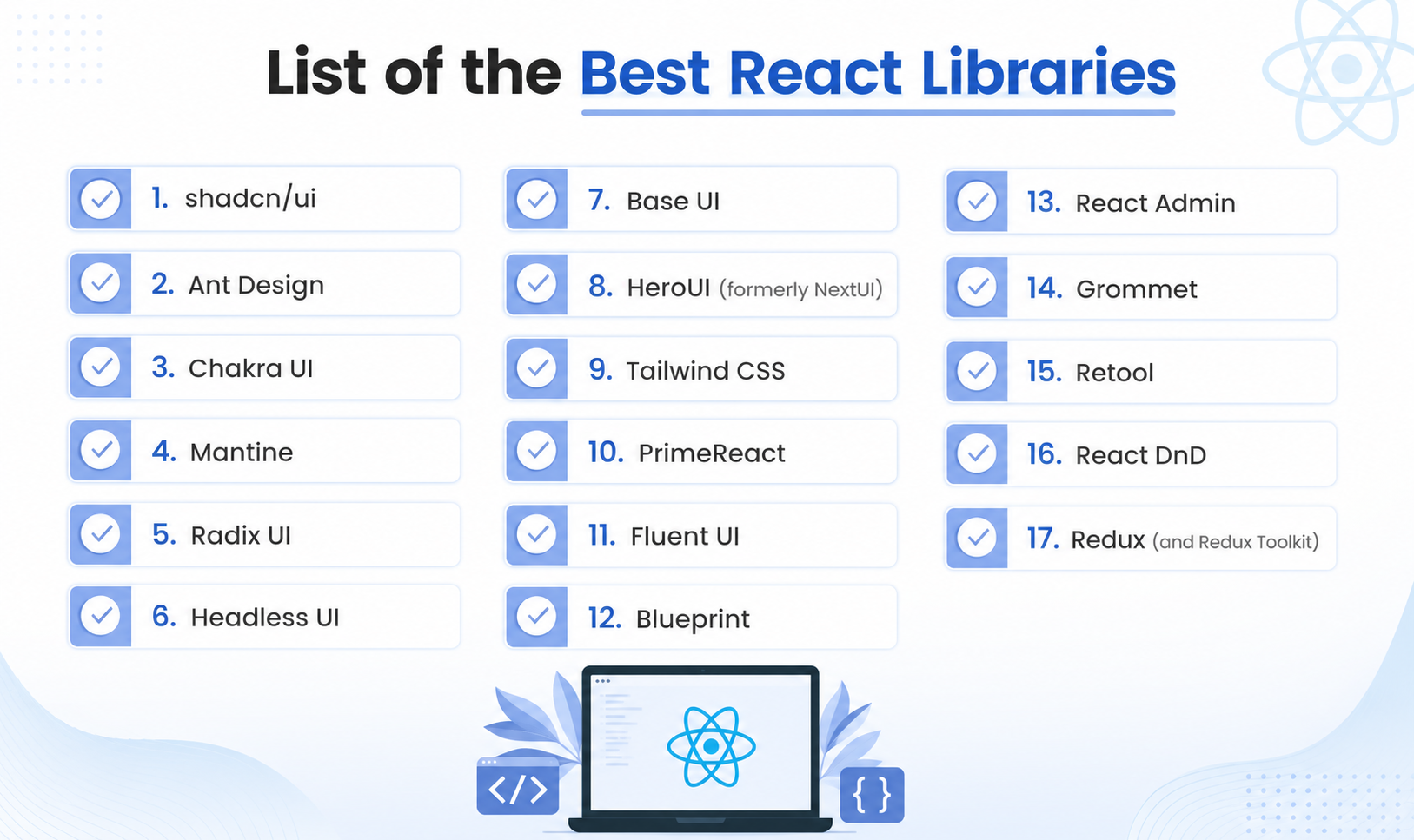
1. shadcn/ui
Start here if you start anywhere. shadcn/ui went from a weekend project to the default for new React and Next.js apps, and it's past 115,000 GitHub stars, more than any conventional component library.
It isn't really a library. Nothing to install, no version to track. You run a CLI command, the component code drops into your repo, and from then on it's yours to change. Underneath it leans on Radix (or now Base UI) for accessibility and Tailwind for styling. v0, Cursor, and Claude Code all generate it by default, which says a lot about its reach.
Owning the code cuts both ways. Nobody patches your button but you. Most teams starting fresh take that deal happily.
Material UI (MUI)
MUI is still the giant. Roughly 98,000 stars, close to 10 million downloads a week, and a fixture at places like Spotify, Amazon, and Netflix where rolling your own isn't on the table.
It outgrew Material Design a while ago. The Base UI and Joy UI layers let you build something that owes nothing to Google, and its Data Grid and Autocomplete save weeks on their own. The tax is theming. Customize it deeply, and you're learning a system, not tweaking a few props.
2. Ant Design
Reach for Ant Design when the app is data-heavy and business-facing. About 99,000 stars, north of a million weekly downloads, 70-plus components, and a design language built for dashboards and admin screens rather than marketing pages.
Alibaba, Baidu, and Tencent all run on it. Tables, forms, filters? Strong default. A consumer product that wants its own look? You'll be pushing against the grain.
3. Chakra UI
Chakra has always sold developer comfort: accessible components, style props, painless dark mode. Call it 38,000 stars and 530,000 downloads a week.
Before you commit, know that v3 was a clean rewrite. Styling left Emotion for Panda CSS (build-time, typed, near-zero runtime), and the components now sit on Ark UI. Nothing's dead, but the API moved enough that a lot of teams are camped on v2 deciding whether to make the jump. Better to know that going in than to find out mid-migration.
4. Mantine
Mantine turned into one of the best all-rounders almost without anyone noticing. Around 31,000 stars, roughly half a million weekly downloads, and a kit that's frankly enormous: 120-plus components and 100-plus hooks, including things you'd usually go hunting for like date pickers, a rich text editor, and spotlight search.
The @mantine/hooks package earns its keep even if you skip the components entirely. Mantine 8 brought CSS modules, and 9 is on the way. Chakra refugees tend to land here.
5. Radix UI
A big slice of the modern ecosystem, shadcn/ui included, is built on Radix. The primitives pull about 6.4 million downloads a week against roughly 19,000 stars. You get unstyled, keyboard-correct, WAI-ARIA building blocks (dialogs, menus, popovers, comboboxes) and you supply the styling, usually Tailwind.
The wrinkle: WorkOS bought Radix and some components have gone quiet. Base UI, out of the MUI team, has become the more active option at the same layer. Radix isn't going anywhere and still ships under millions of apps, but if you're choosing a primitive layer today, weigh both.
6. Headless UI
From the Tailwind team, Headless UI is a small set of unstyled, accessible components made to snap together with Tailwind classes. Somewhere around 2 million downloads a week.
The component count is tiny on purpose, maybe ten. Its API is the friendliest of the headless crowd, and if you already live in Tailwind, it feels like home. The day you need a virtualized combobox or a real data table, you've outgrown it. For menus, dialogs, and toggles, it's quick and clean.
7. Base UI
The new name to watch. Base UI comes from the MUI team as a fresh, actively maintained primitive layer, pitched squarely at Radix's slowdown. Same premise as Radix, unstyled and accessibility-first, but with the backing of the most-downloaded component library around.
It's young, so the numbers are still climbing, which is half the appeal. Choosing a headless foundation for something that has to last? Put it next to Radix and compare before you decide.
8. HeroUI (formerly NextUI)
If you knew this as NextUI, it's HeroUI now. The rename drops the implied tie to Next.js (it's happy with Vite, Remix, and Astro) and sidesteps confusion with Vercel's own products. Migration is close to a find-and-replace from @nextui-org to @heroui, so nothing you learned goes to waste.
Roughly 28,000 stars, about 340,000 downloads a week. HeroUI v3 landed in early 2026 as a ground-up rewrite: 75-plus web components, a new React Native library, every animation moved to CSS with no JS runtime, and React 19 support out of the box. React Aria handles accessibility, Tailwind v4 handles the look. Pick it when polish matters as much as function.
9. Tailwind CSS
Not a component library, but half this list assumes it, so here it is. Tailwind is utility-first CSS you write straight in your markup, and it's everywhere: about 88,000 stars and something like 19 million weekly downloads.
Version 4 shipped a much faster engine and reworked config and theming, so if you've been away, expect changes. Utility-first won the styling argument, and most of the newer component libraries are Tailwind-first as a result.
10. PrimeReact
PrimeReact is a big, workmanlike kit. Ninety-plus components running from plain buttons to serious data tables, charts, and calendars. Around 8,000 stars, roughly 200,000 downloads a week, and a client list that includes Mercedes, Ford, Intel, and Nvidia.
Coverage is the selling point, along with a theme designer that'll mimic Material or Bootstrap or let you build your own. The DataTable, TreeTable, and DataView components chew through large datasets with lazy loading, sorting, and filtering, so you're not wiring that yourself.
11. Fluent UI
Fluent is Microsoft's design system in React, the thing behind much of the Microsoft 365 look. Around 19,000 stars, roughly 180,000 weekly downloads on the main package, and coverage across web, Windows, macOS, iOS, and Android.
Get the version right. The current line is Fluent UI React Components v9. The old Northstar branch hit end of life in July 2025, so anything new starts on v9. If your app needs to sit comfortably next to Office, this is the obvious call.
12. Blueprint
Blueprint, out of Palantir, is made for dense, busy interfaces. The dashboards and analysis tools where a single screen holds a hundred things. About 20,000 stars and roughly 200,000 downloads a week on @blueprintjs/core.
You get a deep component set, a 500-plus icon library in two sizes and two formats, and dependable date and time pickers. Nobody's building a landing page with it, but for information-dense internal tools it's solid. (An older version of this article claimed 1.6 million weekly downloads. That was simply wrong; the real number is nearer 200,000.)
13. React Admin
Building a B2B or admin app? react-admin saves you a pile of work. Around 25,000 stars, MIT-licensed, stable, and running in thousands of companies. It sits on React with your choice of UI kit and hands over components and hooks for the unglamorous parts: data grids, search and filter, notifications, routing, and full CRUD.
It doesn't care about your backend, with adapters for most REST and GraphQL setups plus Firebase, Prisma, and friends. For record-heavy internal tools, it's a serious head start.
14. Grommet
Grommet, built and maintained by Hewlett Packard Enterprise, is a mobile-first framework that takes accessibility seriously. Around 8,000 stars, roughly 25,000 downloads a week. It slots into existing projects without drama, themes cleanly to a brand, and the screen-reader support holds up. Unshowy, dependable, and worth a look when accessibility is a hard requirement.
15. Retool
In here with an asterisk. Retool isn't an open-source npm package like everything else. It's a commercial low-code platform for internal tools, dashboards, and admin panels, built around a drag-and-drop canvas with 90-plus components and connectors to more or less any API or database.
A previous version of this article slapped GitHub stars and download counts on it, which measure nothing here since the product isn't open source. If you want internal tooling shipped fast and don't mind paying for a platform, it delivers. Just file it under a different category from the rest.
16. React DnD
React DnD builds drag-and-drop interfaces- your reorderable lists and Kanban boards- on top of the HTML5 drag-and-drop APIs. Around 22,000 stars, roughly 4 million downloads a week, so plenty of company and plenty of stability.
Its release cadence has cooled off, though. For reordering in particular, a lot of teams have moved to dnd-kit, which is newer, maintained, and better on accessibility out of the box. React DnD still does the job. Just compare the two before you start.
17. Redux (and Redux Toolkit)
Redux is still the benchmark for predictable state, the core repo around 61,000 stars and the react-redux bindings near 8 million weekly downloads.
One thing, though: stop writing Redux the old way. Redux Toolkit is the recommended path now, and it deletes most of the boilerplate that earned Redux its verbose reputation. On a new project, reach for @reduxjs/toolkit with react-redux. And for a small app you may not need any of it. Zustand and Jotai got popular for a reason.
Conclusion
In a world where having the right tools can make a big difference, ReactJS component libraries are extremely useful for creating strong and dynamic web applications.
By carefully choosing and using these libraries, businesses can improve efficiency, performance, and user experience. However, leveraging the potential of the above-mentioned React library list requires expertise and experience.
This is where hiring skilled ReactJS developers becomes crucial. With their deep knowledge and hands-on experience, they can seamlessly integrate the right libraries into your project, ensuring optimal performance and scalability.
The right libraries make a real difference to how fast you ship and how well the result holds up later. Knowing which ones fit, and wiring them together without creating problems for yourself, is the harder part.
If you'd rather not learn every trade-off the slow way, our ReactJS development company has shipped with these tools before and can put the right stack in place for what you're building.

Frequently Asked Questions

Depends on the project. Most new apps start with shadcn/ui. If you want a big component set with a large company behind it, MUI. For dashboards full of tables and forms, Ant Design.
Not in the usual sense. You copy the components into your own codebase and look after them yourself, so there's nothing to install or upgrade.
It's HeroUI now. Same library, new name, and switching over is basically a find-and-replace on the package. v3 shipped in early 2026 as a full rewrite.
On a big app, use Redux Toolkit instead of plain Redux. On a small one, Zustand or Jotai will probably cover you.

By Mangesh Gothankar


By Ashwani Sharma
By Achin Verma








 4.8 out of 5 by