Booking appointments, messaging doctors, tracking a chronic condition. Most of that now happens inside an app, not a waiting room. Analysts put the mHealth market at $45 billion this year. By 2034, they expect it to be north of $113 billion.
A medical app carries a different weight than a typical app. You're handling sensitive patient data. You're working inside strict healthcare regulations. And you're asking patients and doctors to trust you with their health.
This guide covers how to build a medical app to actually build one: the right features, compliance, cost, and the mistakes that kill most healthcare app projects before launch.
Why Healthcare App Development Is Booming
Healthcare didn't move online because it was trendy. It moved because the old way was slow, and slow doesn't work when someone's health is on the line.
1. Telemedicine Became a Habit, Not a Backup Plan: Video visits used to be the fallback option. Now patients book them on purpose for a lot of follow-ups. No commute, no sitting in a waiting room, and the doctor still gets what they need from the call.
2. Remote Monitoring Catches Problems Earlier: A wearable tracking blood pressure or glucose feeds that data to a doctor as it happens. A spike doesn't sit unnoticed until the next scheduled checkup. It's a big part of why chronic disease management apps and medication adherence tools are pulling in serious investment right now.
3. Machine Learning Made Smarter Apps Affordable: Symptom checkers and early risk scoring used to require enterprise budgets. Now a mid-sized healthcare app development team can build them. Machine learning is doing more of the pattern-spotting that used to depend entirely on a clinician noticing something during a visit.
4. Patients Expect the Same Convenience They Get Everywhere Else: People manage their bank accounts and order groceries from their phone. They expect healthcare providers to offer that same convenience, and the ones who can't are losing patients to ones who can.
None of this guarantees patient engagement on its own. The healthcare apps that actually succeed are the ones built around one real problem, solved well, not the ones trying to check every box on this list at once.
Types of Medical & Healthcare Apps
Healthcare mobile app development covers a lot of ground. A hospital's internal scheduling tool and a meditation app for anxiety both technically count, but they don't share much beyond that label. Which category you're building in decides almost everything else.
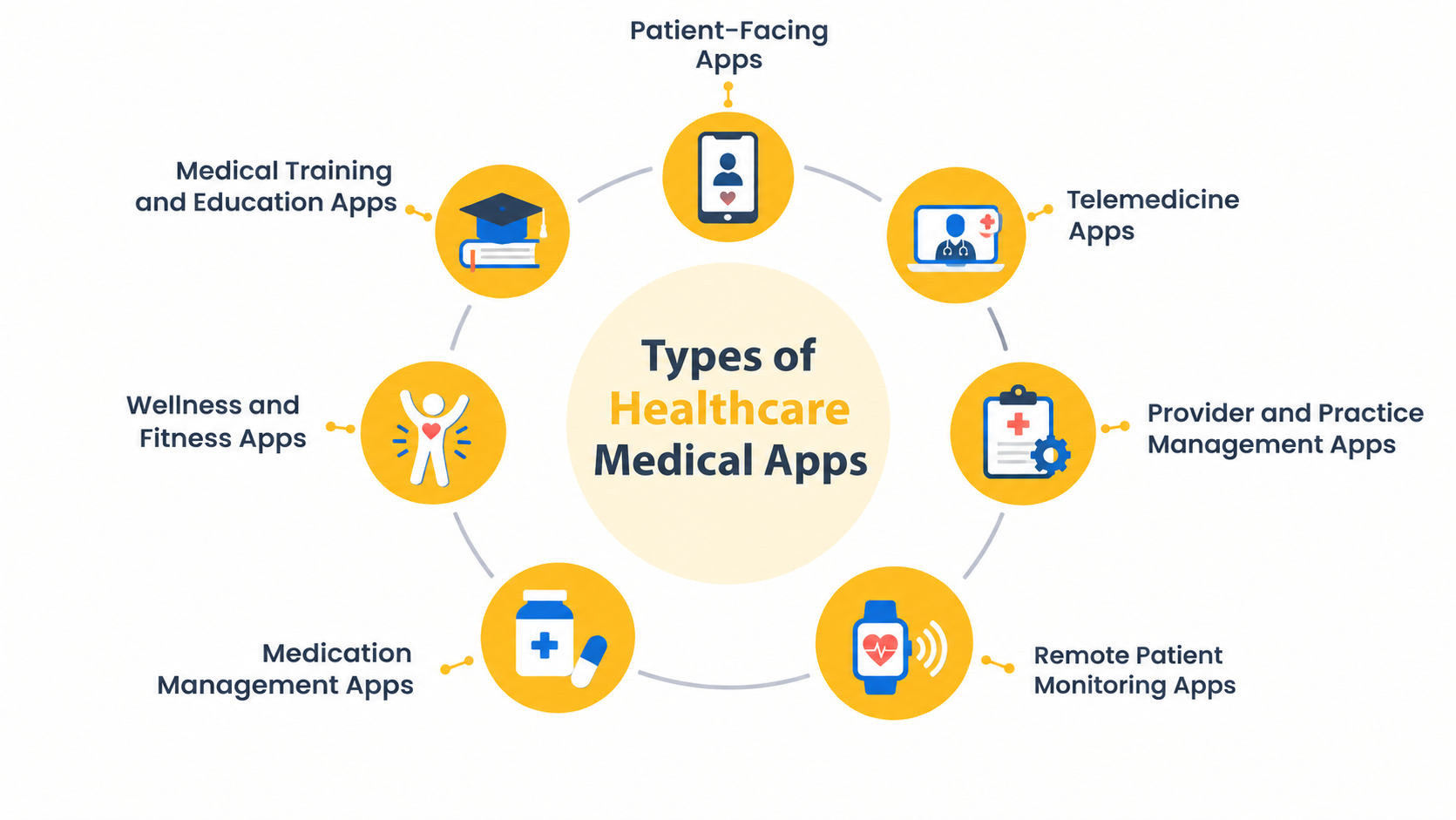
1. Patient-Facing Apps
Appointment booking, secure messaging with a provider, prescription refills, lab results. Think MyChart. The people using this are often juggling multiple medications or appointments, so confusing navigation gets abandoned fast.
2. Telemedicine Apps
Video consultations, e-prescriptions, secure chat. Teladoc built its whole business on this. What actually breaks trust here usually isn't the feature set; it's a call that lags or drops on a patient's home connection. That kind of thing happens more than most teams plan for.
3. Provider and Practice Management Apps
Built for doctors, clinics, and hospital staff, not patients. Scheduling, access to electronic health records, billing, internal messaging. Quiet category. Clinics often spend more here than on anything patient-facing, since it eats directly into staff time.
4. Remote Patient Monitoring Apps
Data streams in from wearables and connected medical devices, and the app flags what needs attention. A cardiac patient wearing a monitor after surgery is a common case. Getting the data in is the easy part. Deciding what counts as an actual alert versus routine noise is where teams struggle.
Recommended Read: A Guide to Build a HIPAA Compliant Healthcare App
5. Medication Management Apps
Dosage reminders, refill tracking, drug interaction checks. Small feature set, but people open these several times a day, so reliability matters more here than in most other categories. A reminder that fails silently means a dose gets skipped.
6. Wellness and Fitness Apps
Activity tracking, nutrition logging, sleep, sometimes mental health support. Bigger audience, lighter compliance burden than clinical apps. Still worth treating the data with real care, since it's personal even if it's not clinical.
7. Medical Training and Education Apps
Case studies, certification tracking, continuing education for healthcare professionals and students. Smaller market. Sticky though, since a lot of these users are required to keep learning to hold onto their license.
Pick one of these early and commit. Trying to serve two categories at once usually means neither user gets what they actually need.
Step-by-Step: How to Build a Medical App
Step 1: Start With Market Research and a Clear Problem
"An app for healthcare" isn't a product idea. It's a category. "An app that cuts no-show rates for physiotherapy clinics" is something you can actually build and sell.
Get specific before you write a single requirement. What problem, exactly? Who's using it, patients or providers or both? And go read competitor reviews on the App Store. People complain in public, and those complaints are basically free research.
Step 2: Get Compliance Right From the Start
Compliance shapes your architecture. It's not something you add in week 40 before launch.
If you're touching US users, that's HIPAA. EU users, GDPR. And you'll want HL7/FHIR standards so the app can actually exchange data with electronic health records systems instead of sitting isolated. Build the encryption, audit logs, and access controls in from the beginning. Adding them after a compliance review flags a gap costs a lot more, both in money and in months.
Step 3: Take Security Seriously
A stolen patient record sells for more than a stolen credit card number on the black market. Credit cards get canceled. Health records don't.
So: encryption for data in transit and at rest. Multi-factor authentication. Access controls where a receptionist and a physician aren't seeing the same screens. Secure messaging, not plain SMS, for anything involving a patient's health. And penetration testing on a schedule, not once at launch and never again.
Step 4: Choose Features That Match Your Audience
Go back to the problem you wrote down in step one. Every feature on the list should trace back to it, and by month two of a build, that's usually the first discipline to slip.
Patients mostly touch the same things: their profile, booking a visit, messaging or video with a doctor, their own records, refills, reminders. That's it, that's the app for most of them. Providers are a different animal. They want their patient history to load fast, they need the EHR connection to actually work, they want their own calendar, and somewhere to write notes that doesn't feel bolted on. Drug interaction checks and wearable integration can wait. They're real features, just not first ones.
Build less than you're tempted to. Five things done well beats fifteen things done at 60%. And honestly, if you don't have the timeline or the budget to build all this in-house, hiring offshore developers who've actually shipped healthcare apps before is often the faster path, rather than stretching your own team thinner than it should be.
Step 5: Design for Trust
Someone opening a health app is often stressed, or in pain, or scared about a result. That changes what "good design" means here.
Bigger tap targets. Fewer steps to book an appointment or message a doctor. Something visible that signals the connection is secure. And real accessibility work: screen readers, adjustable text size, contrast that actually meets guidelines, not just something that looks fine to a designer with good eyesight.
Pick the Right Tech Stack
Most patient-facing apps go with Flutter or React Native now. Cheaper, faster, and the performance gap versus native barely matters unless you're doing something like syncing tightly with a specific medical device.
Step 6: Development, Testing, and QA
Run this in sprints with actual demos, not just standups, so scope creep gets caught in week three instead of month six. Test across the phones your users actually own, which for a lot of patients still means a three-year-old Android device, not the newest iPhone. Run security testing before every release that touches patient data. And put the app in front of real clinicians before launch. Workflows in an actual clinic rarely match what looked reasonable on a whiteboard.
Step 7: Launch and Deploy
Getting listed on the App Store or Google Play Console is paperwork. What takes real planning is hosting with a signed BAA if HIPAA applies, monitoring for access patterns that look off, and having an incident response plan written before you need it.
Step 8: Maintain and Improve
Set aside 15 to 20 percent of the build cost every year after launch for updates, patches, and whatever new regulation shows up. Skip this and the app quietly gets less secure and less useful within a year or two, usually without anyone noticing until something breaks.
Must-Have Features in Medical App
Most medical app features lists online just enumerate what's technically possible. That's not the same as what a patient actually opens the app for on a Tuesday.
For Patients
a) Messaging and video calls come first. Not because it's flashy; it's the thing that replaces a phone call to the front desk, and if it's clunky, patients just go back to calling.
b) Lab results and visit history need to be easy to find. People check this right before an appointment, trying to remember what the doctor said last time.
c) Booking has to show real availability. Nobody wants to request a slot and then wait for a callback confirming it. That's not an improvement over calling the office.
d) Medication reminders and refill requests get opened constantly, way more than most other features, simply because managing daily pills is a daily task.
e) And health tracking, vitals, symptoms, whatever fits the condition, feeds directly into what a provider sees on their end. It's the bridge between the patient app and remote monitoring.
For Providers
a) A doctor mid-call doesn't want to hunt through five screens for a patient's history. It needs to load fast and show what matters first.
b) The app also has to sync with whatever EHR system the clinic already runs. Build something that doesn't talk to the existing records, and staff will quietly go back to their old workflow within a month.
c) Access has to be role-based. A front-desk staffer seeing the same screen as a physician is a compliance problem waiting to happen, not just a design choice.
d) Scheduling, billing, and internal notes belong in one place too, so staff aren't logging into three different tools to get through a single patient visit.
What Can Wait
AI symptom checkers, drug interaction alerts, wearable integration, multi-language support, all worth building eventually. None of it matters if booking an appointment still feels harder than it should. Nail the basics, then add these based on what real users actually ask for.
Artificial Intelligence Features for the Healthcare Apps
Healthcare app development has moved faster here than almost anywhere else in the last two years. Most feature lists either skip AI entirely or pile it on without asking why. Both are mistakes. AI should make the core features work better for medical professionals and patients. It shouldn't be a separate product bolted on top.
For Patients
1. AI symptom checkers and intake: Probably the most requested AI feature in patient-facing healthcare apps today... The part teams skip too often is the disclaimer and the escalation path to an actual clinician. This is triage support. It is not a diagnosis, and an app that blurs that line is asking for trouble.
2. AI-powered drug interaction checks: A static lookup table catches the obvious stuff. A machine learning model trained on a patient's full medication and condition history catches more, especially once someone is filling prescriptions from two or three different providers who don't talk to each other.
3. Predictive medication adherence nudges: A smaller feature, but people underrate it. In chronic disease management apps this isn't cosmetic. A missed dose there has real consequences for the treatment plan.
4. Generative AI for patient communication: Plain-language summaries of lab results or visit notes, always reviewed by a clinician before anything goes out.For Providers
1. Ambient clinical documentation: Where most healthcare organizations should start if they're only building one AI feature for providers... It's hard to overstate how much goodwill this single feature buys with clinical staff.
2. Clinical decision support (CDS): Models that surface relevant guidelines, flag anomalies in vitals or lab trends, or calculate a risk score at the point of care, pulling from electronic health records and remote patient monitoring data.
3. Predictive risk scoring for remote patient monitoring: A model trained on a patient's own baseline can tell routine noise from an actual early warning sign, so the intervention happens while it still matters instead of after the fact.
What to Watch Before You Build:
AI features come with their own compliance and reliability burden. Any feature touching a clinical decision needs documented model validation, a human reviewer in the loop, and an audit trail.
Your Team In India saw this firsthand while helping VitaSync, a European healthcare SaaS platform, scale its remote patient monitoring product. VitaSync's fixed-threshold alerts were flooding care teams with noise until the model shifted to each patient's own baseline. Alert fatigue dropped, and the platform scaled to more patients without scaling its support burden.Medical App Development Cost Breakdown
EHR integration is usually where an estimate falls apart. Hospital systems weren't built with mobile apps in mind, so getting one to talk to your app takes custom engineering on both sides. Video for telemedicine has a similar trap. The demo works fine. What actually costs money is keeping calls stable once you've got real users on real networks. And AI features almost always run over budget, because the model itself is the small part. Collecting training data, testing edge cases, tuning it after launch, that's where the hours go.
HIPAA compliance adds 20 to 50 per cent on top of a base build. That number tends to trigger some negotiation. It's the wrong place to cut. A breach or a fine costs more than the extra percentage ever would.
Real-World Challenges & How to Avoid Them
Most of what derails a healthcare app has nothing to do with code. It's planning gaps that don't show up until the app is already in front of real users.
1. Compliance gets treated as a checklist instead of a foundation
Teams budget for features first and figure HIPAA or GDPR can get bolted on before launch. Then a security review finds that sensitive patient information is sitting somewhere it shouldn't be, and fixing it means touching parts of the app that were supposedly done months ago.
2. The app doesn't match how clinics actually work
A scheduling flow that looks clean in a demo can fall apart the moment a nurse tries to use it between patients. Skipping thorough market research with actual healthcare organizations, not just end users, is how this happens. Nobody consulted the people running the front desk.
3. Integrations take longer than anyone expects
Connecting to an EHR, a pharmacy network, or an insurance database sounds like a weekend of API work. In practice, legacy healthcare systems are inconsistent, and getting two systems talking cleanly can eat a third of the whole development process.
4. Stakeholders keep adding requests mid-build
Physicians and administrators will ask for one more feature, then another. Some genuinely improve patient outcomes. Most are nice-to-haves dressed up as must-haves. Without someone willing to say no, the technology stack and the timeline both start slipping.
5. The UX gets built for the team, not the patient
A lot of patients managing a chronic condition are older, less comfortable with apps, or dealing with a stressful diagnosis. An app that assumes tech fluency loses user satisfaction fast, no matter how strong the backend is.
None of these are really coding problems. They're the reason experienced healthcare app developers spend so much time upfront on planning, not because it's a formality, but because catching this stuff on paper is a lot cheaper than catching it after launch.
Why Healthcare Teams Choose an Offshore Development Partner
Building in-house is possible, but most teams don't have the bandwidth or the specialized skill set already on staff, especially for something with as many moving compliance and integration pieces as a medical app. That's why a lot of healthcare organizations bring in an experienced offshore healthcare app development company instead of hiring and training a team from scratch.
Your Team In India has been building custom healthcare software for over 16 years, for clients ranging from early-stage startups to Fortune 500 companies. Its track record lines up with the exact things this guide has been pushing you to check before you build.
-
Compliance, the same way this guide has been arguing it should work. HIPAA and GDPR compliant as a baseline, with HL7, FHIR, and DICOM support built in.
-
Security credentials you can actually verify. ISO 27001 and SOC 2 certification mean a third party has audited the security processes, not just a badge on a website.
-
EHR integration experience, where most project timelines actually break. Certified developers, and higher client retention.
-
AI capability, not just legacy healthcare development work. Ambient documentation, clinical decision support, predictive risk scoring, with the compliance guardrails underneath.
-
Engagement models that fit how you actually want to work. Dedicated team, offshore development center, or virtual captive center, your call.
Conclusion
Reading a guide like this is one thing. Building a compliant, secure, genuinely useful medical app is another, and it's not something you want a generalist team learning on your project.
We've spent years and are focused on healthcare application development services, HIPAA and GDPR compliance, EHR integrations, remote patient monitoring, the parts of the process that decide whether an app survives contact with real patients and real regulators. We've seen where these projects usually go wrong, and we plan around it from day one.
If you're exploring how to build a medical app for your practice, startup, or health system, we'd rather talk through your specific situation than sell you a generic package.
Have a medical app idea? Talk to our healthcare app development team and get a clear, honest estimate before you commit a single development hour.
Frequently Asked Questions

Depends on how it was architected. If patient data was already separated and encrypted, an audit usually just flags targeted fixes. If not, you're likely rebuilding core parts. A compliance audit is the only way to know which one you're dealing with.
Not legally, but it helps. Specs written without clinical input tend to miss how care actually happens day to day. Even a few hours a month from a practicing provider during planning catches workflow problems before they're expensive to fix.
Depends on your target audience. Building for hospital staff, check what devices they're issued. For a general patient audience, cross-platform frameworks get you both iOS and Android apps from one codebase, without doubling your timeline.
Generally no. A wellness app tracking steps or sleep isn't handling protected health data the way a clinical app is, so rules like health insurance portability laws don't apply the same way. Still, users are trusting you with valuable data about their health, so it's not something to be loose with.

By Mangesh Gothankar


By Ashwani Sharma
By Achin Verma







 4.8 out of 5 by